
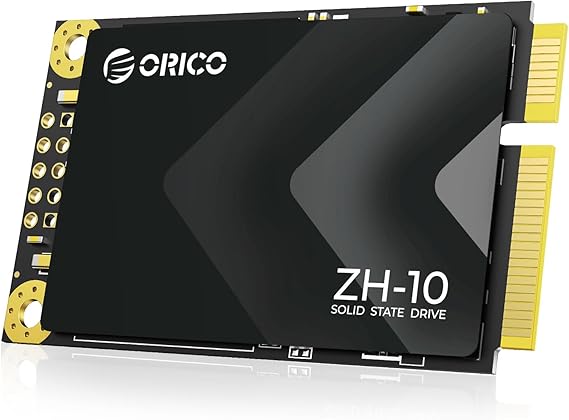
Polisy OS SSD
$26
Update your Polisy to the latest OS and software effortlessly! Just swap in this upgraded internal SSD, restore your backup, and you’re all set: quick, easy, and hassle-free.
Out of stock See it on universal-devices.com
Checkout is on universal-devices.com: Add to cart takes you to your cart there.
Details
Update your Polisy to the latest OS and software effortlessly! Just swap in this upgraded internal SSD, restore your backup, and you’re all set: quick, easy, and hassle-free.
 Steps:
-
Save your settings: Make a backup of your IoX and PG3 plugins.
-
Turn it off: Unplug your Polisy from power.
-
Open it up: Remove the cover of the unit.
-
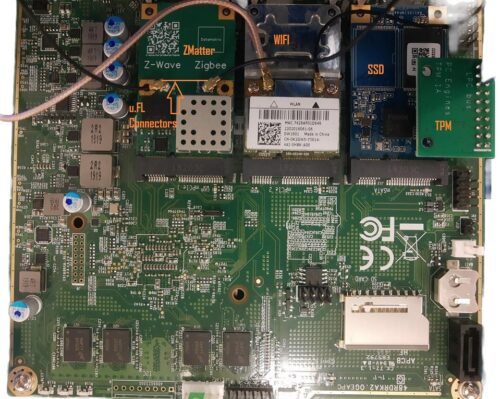
Remove the small board: Carefully take out the tiny board sitting above the storage drive (on the right, labeled TPM in the picture).
-
Take out the old drive: Gently release the clips holding the drive and slide it out.
-
Insert the new drive: Slide the new drive in and gently press it down until the clips lock it in place.
-
Put the small board back: Carefully reinstall the tiny TPM board you removed earlier and make sure all pins are connected (very important).
-
Close it up: Put the cover back on.
-
Power it back on: Plug in your Polisy and turn it on.
-
Restore your settings: Use your IoX and PG3 backups to get everything back just the way it was.